

From writing emails and researching topics to creating presentations and organizing tasks, AI productivity tools are changing the way people work. Instead of spending hours on repetitive tasks, you can use artificial intelligence to handle the first draft, summarize information, organize your work and automate routine processes.
- Why Are AI Productivity Tools Becoming So Popular?
- 10 Best AI Tools for Productivity You Need to Try in 2026
- 1. ChatGPT – Your All-Purpose AI Assistant
- 2. Google Gemini – Useful for Google-Centric Workflows
- 3. Claude – Great for Long Documents and Detailed Work
- 4. Perplexity – Speed Up Online Research
- 5. Canva AI – Create Designs Without Starting From Scratch
- 6. Notion AI – Organize Your Work and Notes
- 7. Zapier – Automate Repetitive Tasks
- 8. Microsoft Copilot – Useful for Office and Work Tasks
- 9. Gamma – Create Presentations Faster
- 10. Otter.ai – Spend Less Time Writing Meeting Notes
- Which AI Tool Should You Choose?
- How to Get the Most From AI Tools
- How Much Time Can AI Actually Save?
- Best AI Tools for Different Users
- Tips for Using AI Responsibly
- Final Thoughts
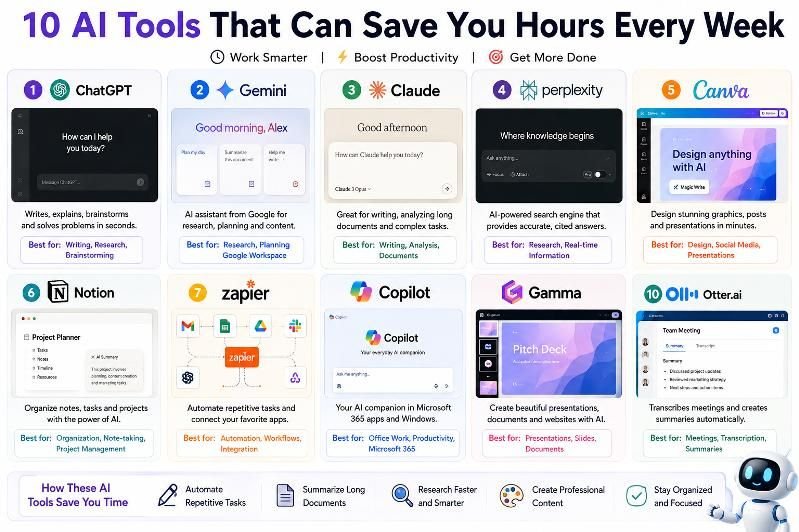
In 2026, AI tools have become useful for much more than simple chatbot conversations. Platforms such as ChatGPT, Gemini, Claude, Perplexity, Canva AI and Notion AI can assist with research, writing, design, data analysis and everyday productivity. Automation platforms such as Zapier can also connect different apps and reduce repetitive work.
The key is not to let AI replace your judgment. Instead, use it to handle time-consuming tasks so you can spend more time on important decisions and creative work.
Why Are AI Productivity Tools Becoming So Popular?
Many everyday tasks are repetitive. Writing similar emails, summarizing long documents, preparing meeting notes, researching a topic and creating presentations can consume a significant amount of time.
AI tools can help by:
- Generating first drafts
- Summarizing lengthy information
- Organizing notes and tasks
- Researching topics
- Creating presentations
- Designing graphics
- Analyzing documents and data
- Automating repetitive workflows
- Improving written communication
- Turning ideas into usable content
The amount of time saved depends on the task, the tool and how effectively you use it. AI-generated information should also be reviewed before it is used for important work.
10 Best AI Tools for Productivity You Need to Try in 2026
| AI Tool | Best For | Time-Saving Task | Skill Level |
|---|---|---|---|
| ChatGPT | Writing & research | Drafting, summarizing, brainstorming | Easy |
| Google Gemini | Google ecosystem | Research, planning, documents | Easy |
| Claude | Writing & analysis | Documents, research, coding | Easy |
| Perplexity | Web research | Finding and summarizing sources | Easy |
| Canva AI | Design | Posts, presentations, graphics | Easy |
| Notion AI | Organization | Notes, writing, task management | Easy |
| Zapier | Automation | Connecting apps and workflows | Medium |
| Microsoft Copilot | Office work | Documents, email and productivity | Easy |
| Gamma | Presentations | Creating slide decks | Easy |
| Otter.ai | Meetings | Transcription and meeting notes | Easy |
1. ChatGPT – Your All-Purpose AI Assistant
ChatGPT can be useful for a wide range of everyday tasks, making it one of the most flexible AI productivity tools available.

It can help with writing, brainstorming, summarization, research, document analysis, coding and image-related tasks. OpenAI’s current documentation also highlights file uploads, image understanding and Deep Research for multi-step online research.
How ChatGPT Can Save Time
- Create a first draft of an article or email
- Summarize long documents
- Brainstorm headlines and content ideas
- Turn notes into structured content
- Explain complicated topics
- Analyze uploaded files
- Create outlines and checklists
- Help with coding and technical tasks
Example Prompt
“Turn these meeting notes into a concise summary with five action items and assign each task to the person mentioned.”
Instead of organizing everything manually, you can start with an AI-generated structure and then review it.
Best for: Writers, students, professionals, creators and small businesses.
2. Google Gemini – Useful for Google-Centric Workflows
Google Gemini is particularly useful for people who already rely heavily on Google’s ecosystem.
Google’s current Gemini updates include features connected to productivity, research, Google apps and document creation. Its Productivity Planner Gem, for example, can work with information from apps such as Gmail, Calendar and Drive for supported users.

What You Can Use Gemini For
- Creating content ideas
- Summarizing information
- Planning projects
- Working with documents
- Generating quizzes and learning materials
- Researching topics
- Brainstorming
- Creating visual content
Why It Can Save Time
If your work already happens inside Google’s ecosystem, reducing the need to move information between multiple applications can make everyday tasks more efficient.
Best for: Google Workspace users, students, researchers and professionals.
3. Claude – Great for Long Documents and Detailed Work
Claude from Anthropic is another powerful AI assistant for writing, research, analysis and coding.

Claude can work with documents and images, analyze data, create visualizations and help users produce polished writing. Anthropic also highlights research capabilities that can gather information from the web and produce reports with citations.
Claude Can Help You:
- Review long documents
- Improve articles and reports
- Analyze spreadsheets
- Summarize research
- Brainstorm ideas
- Write and debug code
- Create structured reports
- Improve the clarity of existing content
For writers and researchers who regularly work with lengthy documents, having AI analyze the material can reduce the time spent manually sorting through information.
Best for: Writers, researchers, developers and professionals working with documents.
4. Perplexity – Speed Up Online Research
Research can be one of the most time-consuming parts of creating content. Perplexity is designed specifically around AI-powered search and research.
Perplexity says its answers are backed by sources and citations, while its Research mode can conduct multiple searches, examine numerous sources and produce a comprehensive report.
Use Perplexity For:
- Finding information about a topic
- Discovering sources
- Comparing products
- Researching companies
- Getting background information
- Creating research summaries
- Exploring current topics
A Simple Workflow
- Search for your topic.
- Review the sources provided.
- Open important original sources.
- Compare the information.
- Use the verified findings in your work.
AI search can speed up research, but you should still check important claims against the original sources.
Best for: Researchers, journalists, students, bloggers and content creators.
5. Canva AI – Create Designs Without Starting From Scratch
Designing a presentation, social media post or promotional graphic manually can take considerable time. Canva’s AI features are designed to speed up this process.

Canva says its AI tools can help generate editable designs, presentations and other visual content from a description, while tools such as Magic Write can assist with first drafts and text editing.
Canva AI Can Help With:
- Social media posts
- Presentations
- Posters
- Blog graphics
- Promotional banners
- Image editing
- Marketing content
- Visual concepts
Why It Saves Time
Instead of beginning with a blank design, you can provide a description of what you need and use the generated design as a starting point.
Best for: Bloggers, social media managers, small businesses, marketers and creators.
6. Notion AI – Organize Your Work and Notes
Notion is widely used for notes, project management and knowledge organization, and Notion AI adds AI capabilities directly inside the workspace.

Notion says its AI features can help with writing, editing, task completion, searching connected information and working with files. Its current AI tools also include image generation and editing for supported plans.
Notion AI Can Help You:
- Summarize meeting notes
- Improve written content
- Create task databases
- Organize information
- Search your workspace
- Turn notes into action items
- Work with documents
- Generate or edit certain visual content
Instead of keeping notes in one application and asking an AI chatbot to process them somewhere else, Notion AI keeps many of these tasks inside the same workspace.
Best for: Students, teams, project managers, writers and businesses.
7. Zapier – Automate Repetitive Tasks
Some of the biggest productivity gains don’t come from generating text—they come from automation.
Zapier connects different applications and can create workflows based on triggers and actions. Its current platform also supports AI-powered steps that can summarize, classify, draft and make decisions within workflows.
Examples of AI Automation
- Save email attachments automatically
- Send new leads to a spreadsheet
- Summarize incoming information
- Create tasks from form submissions
- Send notifications when something happens
- Automatically organize information between apps
Example Workflow
New form submission → AI summarizes the request → Creates a task → Sends notification
Once configured, the workflow can handle repetitive steps automatically.
Best for: Businesses, marketers, teams and people who perform repetitive digital tasks.
8. Microsoft Copilot – Useful for Office and Work Tasks
Microsoft Copilot can be especially useful for people who work with Microsoft’s productivity ecosystem.
Microsoft highlights Copilot’s ability to assist with work across applications and organizational data. Current Copilot features also include visual assistance and AI-powered editing in Microsoft 365 applications.
Copilot Can Help With:
- Drafting documents
- Editing content
- Summarizing information
- Creating images
- Analyzing work-related content
- Improving documents
- Getting assistance while working in Microsoft applications
If your workplace already uses Microsoft 365, Copilot can reduce the need to constantly move information between different tools.
Best for: Office users, businesses, students and Microsoft 365 users.
9. Gamma – Create Presentations Faster
Creating a professional presentation often involves several steps: writing the content, arranging slides, choosing images and formatting everything.

Gamma uses AI to help create presentations, documents and webpages from prompts or existing content. Its current tools can generate slides, refine content and apply layouts automatically.
Gamma Can Help You:
- Create presentation outlines
- Turn notes into slides
- Convert documents into presentations
- Improve slide layouts
- Generate visual content
- Restyle presentations
- Prepare pitch decks
Simple Workflow
- Enter your topic or paste your notes.
- Let Gamma create a first draft.
- Review the structure.
- Adjust the content.
- Customize the design.
- Export or present the final version.
Best for: Students, professionals, marketers, entrepreneurs and presenters.
10. Otter.ai – Spend Less Time Writing Meeting Notes
Meetings can be productive, but manually writing down everything that was discussed can be distracting and time-consuming.

AI meeting assistants such as Otter.ai are designed to help with transcription and meeting notes, allowing users to focus more on the conversation and less on typing.
An AI Meeting Assistant Can Help With:
- Transcribing conversations
- Creating meeting summaries
- Finding important points
- Identifying action items
- Reviewing discussions later
- Creating searchable meeting records
Instead of trying to remember everything discussed during a meeting, you can review the transcript and summary afterward.
Best for: Teams, managers, students, journalists and professionals who attend frequent meetings.
Which AI Tool Should You Choose?
With so many AI applications available, choosing the right one can be confusing. The easiest approach is to choose a tool based on the task you want to complete.
| Your Task | Recommended AI Tool |
|---|---|
| Writing and brainstorming | ChatGPT |
| Google-related productivity | Gemini |
| Long documents and analysis | Claude |
| Online research | Perplexity |
| Graphic design | Canva AI |
| Notes and organization | Notion AI |
| Workflow automation | Zapier |
| Microsoft Office work | Copilot |
| Presentations | Gamma |
| Meeting transcription | Otter.ai |
How to Get the Most From AI Tools
Simply signing up for an AI tool does not automatically make you more productive. The biggest benefits usually come from using AI as part of a repeatable workflow.
1. Give Clear Instructions
Instead of writing:
“Write an article.”
Try:
“Write a 1,000-word beginner-friendly article about smartphone battery health. Use short paragraphs, H2 headings, bullet points and a comparison table.”
The more useful context you provide, the easier it is for the AI to produce something close to what you need.
2. Use AI for the First Draft
Don’t expect AI to produce a perfect final result every time. Use it to overcome the blank page and create a starting point.
You can then:
- Fact-check the information
- Add your own experience
- Improve the tone
- Add examples
- Remove unnecessary content
- Add original insights
3. Create Repeatable Workflows
If you perform the same task every day, consider turning it into a repeatable AI workflow.
For example:
Research → AI summary → Human fact-check → Draft → Edit → Publish
This approach can make content production more organized.
4. Don’t Trust AI Blindly
AI can produce incorrect, outdated or misleading information. This is especially important when writing about:
- Technology specifications
- Prices
- Financial information
- Health
- Legal matters
- Current events
- Product launches
Always verify important facts using reliable and original sources.
How Much Time Can AI Actually Save?
There is no universal number because productivity gains depend on the task and the person using the tool.

However, AI can potentially reduce the time spent on repetitive activities such as:
| Task | Without AI | With AI Assistance |
|---|---|---|
| Brainstorming ideas | Longer manual process | Generate multiple starting points quickly |
| First draft | Manual writing | AI-generated starting draft |
| Research | Search and organize manually | AI-assisted discovery and summarization |
| Meeting notes | Manual note-taking | Automated transcription and summary |
| Presentation creation | Manual formatting | AI-generated first draft |
| Repetitive workflows | Manual actions | Automated triggers and actions |
The important point is that AI doesn’t necessarily eliminate the work—it can reduce the amount of repetitive work you need to do manually.
Best AI Tools for Different Users
For Students
- ChatGPT
- Gemini
- Claude
- Perplexity
- Notion AI
For Content Creators
- ChatGPT
- Perplexity
- Canva AI
- Claude
- Gamma
For Businesses
- Microsoft Copilot
- ChatGPT
- Zapier
- Notion AI
- Canva AI
For Researchers
- Perplexity
- ChatGPT
- Claude
- Gemini
Tips for Using AI Responsibly
AI can make work faster, but responsible use is important.
Keep these points in mind:
- Verify important information before publishing or sharing it.
- Protect private information and avoid uploading sensitive data unnecessarily.
- Review AI-generated content instead of publishing it without checking.
- Use original ideas and expertise to make your work valuable.
- Check current information because AI tools and their features change frequently.
- Don’t rely on AI alone for important professional, financial, legal or health decisions.
Final Thoughts
The best AI productivity tools are not necessarily the ones that can do the most things. The most useful tool is the one that fits naturally into your daily workflow.
ChatGPT and Claude can help with writing and analysis, Gemini can be useful for Google-centered workflows, Perplexity can speed up research, Canva AI can simplify design, Notion AI can organize information, and Zapier can automate repetitive tasks. Tools such as Copilot and Gamma can also reduce the amount of manual work involved in office tasks and presentations.
Instead of trying to use all 10 tools at once, start with one or two that solve a real problem in your routine. Once you understand how they fit into your workflow, you can gradually add other AI tools.
The goal isn’t to work more with AI. The goal is to spend less time on repetitive work and more time on the tasks that actually matter.