

When you open a website, its images, CSS, JavaScript files and other content have to travel from a server to your device. If that server is far away, the website can take longer to load.
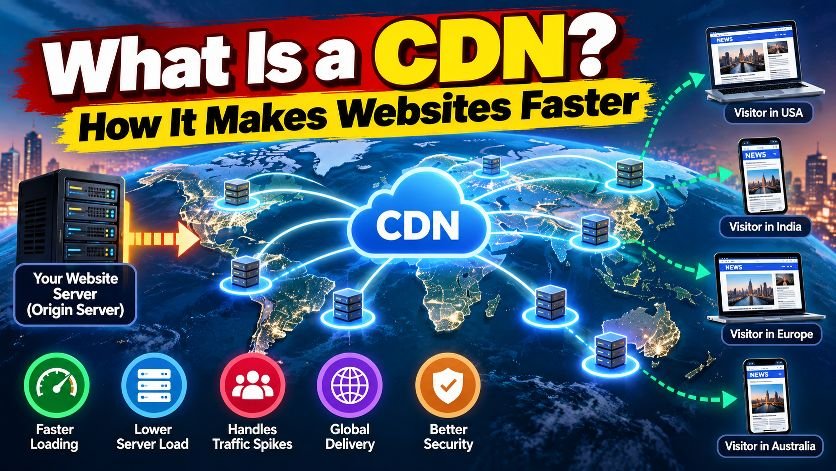
This is where a CDN, or Content Delivery Network, comes in.
A CDN uses a network of servers located in different parts of the world to deliver website content from a location closer to the visitor.
What Is a CDN?
A Content Delivery Network (CDN) is a distributed network of servers that helps deliver website content faster.
Instead of every visitor requesting files directly from the website’s main server, a CDN can store cached copies of frequently requested content at locations around the world.
For example, imagine a website’s main server is located in the United States and someone in India visits the website.
Without a CDN, the visitor may have to request static files directly from the US server.
With a CDN, those files may be served from a nearby CDN location, reducing the distance the data needs to travel.
How Does a CDN Work?
The basic process is simple:
Visitor → CDN Edge Server → Website Server
When a visitor requests a cached file, such as an image or CSS file, the CDN can deliver it from its edge server.
If the requested content isn’t already cached, the CDN can retrieve it from the origin server and potentially store a copy for future requests.
This means repeated visitors may receive the content directly from the CDN instead of repeatedly reaching the origin server.
What Does a CDN Cache?
CDNs commonly cache static website resources such as:
- Images
- CSS files
- JavaScript files
- Fonts
- Videos and other media
- HTML pages, when configured for caching
Not every website needs to cache everything.
For example, login pages, shopping carts, account dashboards and WordPress admin pages generally require different caching rules because they contain dynamic or private information.
Why Do Websites Use a CDN?
1. Faster Website Loading
A CDN can serve cached content from a location closer to the visitor, potentially reducing latency.
2. Lower Server Load
When static files are delivered from CDN servers, fewer requests need to reach the origin server.
This can be particularly useful for websites receiving large amounts of traffic.
3. Better Handling of Traffic Spikes
A website can suddenly receive thousands or even millions of visitors because of breaking news or a viral story.
A CDN can help absorb a significant portion of requests for cached content, reducing pressure on the origin server.
4. Improved Global Delivery
Websites with visitors from different countries can use CDN infrastructure to deliver content from locations closer to those visitors.
5. Additional Security
Many CDN providers also offer security features such as DDoS protection, Web Application Firewalls and bot protection.
However, a CDN should not be treated as a complete security solution by itself.
CDN vs Web Hosting: What’s the Difference?
This is one of the most common questions.
Web hosting provides the main server where your website and its data are stored.
A CDN sits between visitors and that origin server and helps deliver cached content efficiently.
Think of it like this:
Web hosting = Your main warehouse
CDN = A network of local distribution centers
Instead of sending every order from one warehouse, products can be distributed from locations closer to customers.
Does a CDN Make Every Website Faster?
Not necessarily.
A CDN can significantly help with static content and global delivery, but website speed also depends on:
- Hosting performance
- Server response time
- Website code
- Images
- JavaScript
- Database performance
- Caching configuration
- Network conditions
A poorly configured CDN can also create problems, especially when dynamic or frequently changing pages are cached incorrectly.
Is a CDN Useful for WordPress Websites?
Yes. A CDN can be particularly useful for WordPress websites that receive visitors from different locations or experience sudden traffic increases.
For example, a news website may receive a large number of visitors immediately after publishing a breaking story.
Also Read: How to Choose the Best Hosting for Your WordPress Website
Serving cached images, CSS, JavaScript and eligible pages through a CDN can reduce the number of requests reaching the WordPress server.
However, WordPress admin, login pages and other dynamic areas should generally be handled separately from publicly cacheable content.
Popular CDN Providers
Some well-known CDN providers include:
- Cloudflare
- Amazon CloudFront
- Akamai
- Fastly
- Bunny.net
Each has different features, pricing models and configuration options.
CDN vs Cache: Are They the Same?
No.
A cache is stored content that can be reused instead of being generated or downloaded again.
A CDN is a network infrastructure that can use caching to distribute content across multiple locations.
In simple terms:
Caching is the technique.
CDN is the delivery network.
They often work together to improve website performance.
Final Takeaway
A CDN helps websites deliver content more efficiently by storing and serving cached resources from servers distributed across different locations.
For websites with high traffic, international visitors, large media files or sudden traffic spikes, a CDN can be an important part of the performance strategy.
But a CDN isn’t a magic speed button. Good hosting, optimized images, efficient code, database performance and proper caching still matter.